
Why Gmail Storage Usage Is Hard to See
Gmail storage stays full because Gmail never shows you which senders use the most space — deleting recent emails barely helps when a few senders with large attachments hold gigabytes. To actually fix it, rank senders by total storage and delete the biggest first. EmailSlim does this automatically with a free 500-email scan.
Last updated: June 2026When your Gmail storage is full, the first question is usually: "What's taking up all this space?" Gmail shows you your total storage usage, but it doesn't show you which emails or senders are consuming the most storage. This makes it difficult to know where to start cleaning up.
Gmail's search feature works well if you already know what you're looking for. You can search by sender, date, or keywords. But if you don't know which senders are using the most storage, you're left guessing. You might delete hundreds of small emails when a few large emails from a single sender are the real problem.
The Cumulative Storage Blind Spot
Here's a common scenario: You've been subscribed to a retailer's newsletter for years. Each email is relatively small—maybe 200KB with a few product images. Individually, these emails don't seem significant. But over time, you've received thousands of them.
"I thought my storage was full of large attachments. Turns out I had 8,000 emails from one retailer, each around 200KB. That's 1.6GB from a single sender—and I had no idea until I saw it broken down by sender."
This is the cumulative storage blind spot. Thousands of medium-sized emails from the same sender can silently consume gigabytes of storage. Individually, each email seems harmless. Collectively, they're using significant space. Gmail doesn't show you this cumulative view by sender, so you can't see which senders are the real storage culprits.
Account storage
5.6 GB of 15 GB used
Why Gmail Doesn't Show Storage by Sender
Gmail is designed for email management, not storage analysis. Its search and organization features help you find and organize emails, but they don't show you storage usage patterns. Here's why:
Search Requires You to Know What to Look For
Gmail search works well if you know the sender's email address or domain. But to find which senders are using the most storage, you'd need to search for each sender individually and manually calculate the total. This is impractical when you have hundreds or thousands of different senders.
No Cumulative View by Sender
Gmail shows individual email sizes when you open an email, but it doesn't aggregate storage usage by sender. You can't see that one sender's emails collectively use 2GB while another uses only 50MB. This cumulative view simply doesn't exist in Gmail's interface.
Size Search Doesn't Show Totals
Gmail's search operators like larger:5M can find emails above a certain size, but they don't show you the total storage used by each sender. You'd need to search for each sender separately and add up the sizes manually.
Designed for Individual Email Management
Gmail's interface is optimized for managing individual emails or small groups. It's excellent for daily email use, but it's not designed to help you understand storage patterns across thousands of emails from hundreds of senders.
How EmailSlim Shows Storage Usage
EmailSlim analyzes your email metadata to show you storage usage patterns that Gmail doesn't surface. It groups emails by sender and calculates the total storage used by each sender, so you can see which senders are consuming the most space.
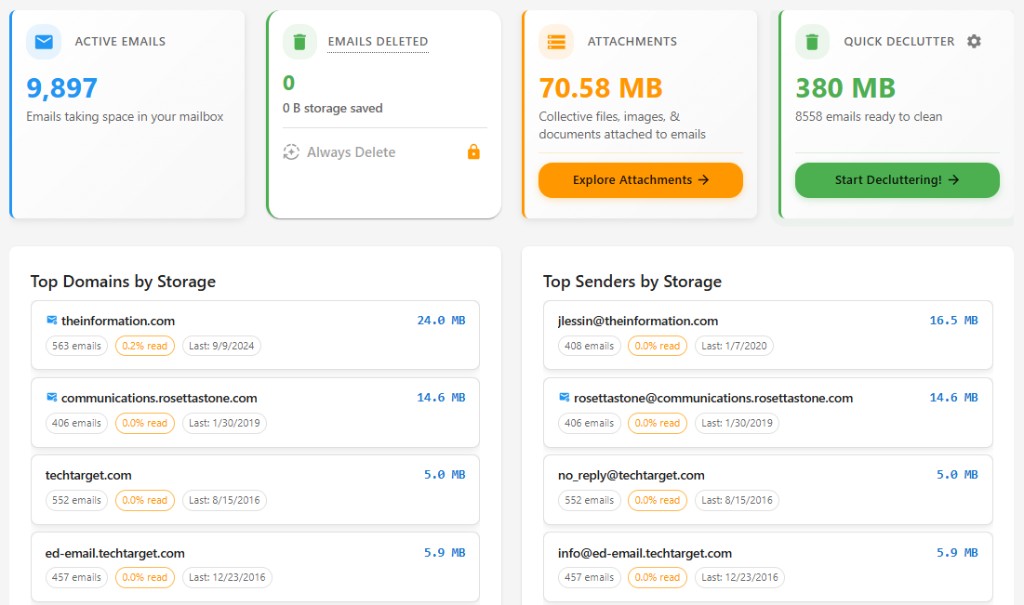
Storage by Sender
EmailSlim shows you which senders are using the most storage, ranked by total email size. This reveals the cumulative impact of thousands of emails from a single sender that might not be obvious when viewing emails individually.
Largest Emails Identified
EmailSlim identifies the largest individual emails, so you can see which emails with large attachments are consuming significant storage space. This helps you prioritize what to delete for maximum storage impact.
All of this analysis happens using only email metadata—sender, date, size, and labels. EmailSlim never reads your email content. Once you see what's using your storage, you can decide what to delete. All deletions happen in Gmail when you approve them, and deleted emails go to Gmail Trash first, where you can recover them for 30 days.
Ranked by total sender storage
See which domains and senders use the most space. No guessing—delete the biggest first.
Top storage hogs
Sample inbox data (simulated, not live)newsletter@retailer.com
8,231 emails
2.4GB
deals@travelportal.com
3,104 emails
1.2GB
updates@saasapp.com
1,987 emails
740MB
Gmail Storage FAQs
Why is my Gmail storage still full after deleting emails?
Two common reasons. First, deleted emails go to Gmail Trash and still count toward your storage quota until you empty Trash—open Trash and choose "Empty Trash now" to reclaim the space immediately. Second, deleting recent or small emails often barely helps, because a few senders with large attachments or thousands of accumulated messages can hold gigabytes that you never targeted.
How do I see which senders are using the most Gmail storage?
Gmail doesn't offer this view. It shows your total storage usage and individual email sizes, but it never aggregates storage by sender, so you can't see that one sender's emails collectively use 2GB while another uses 50MB. EmailSlim builds exactly this view: it analyzes email metadata and ranks senders and domains by their total storage used, so you can delete the biggest first.
Can thousands of small emails really fill up Gmail storage?
Yes—this is the cumulative storage blind spot. A 200KB newsletter seems harmless on its own, but 8,000 of them from a single retailer adds up to about 1.6GB. Because Gmail never shows storage totals per sender, these accumulations stay invisible until you see your mailbox broken down by sender.
Is Gmail storage shared with Google Drive and Photos?
Yes. Gmail's free 15GB is a shared pool across Gmail, Google Drive, and Google Photos, so old email attachments count toward the same limit as your files and photos. Cleaning up the senders that use the most email storage frees space for everything in your Google account.
Does EmailSlim read my emails to analyze storage?
No. EmailSlim analyzes only email metadata—sender, date, size, and labels—and never reads your email content. Nothing is deleted unless you approve it, and deleted emails go to Gmail Trash first, where you can recover them for about 30 days. The free scan covers your first 500 emails with no credit card required.
See What's Using Your Storage
If you're curious about which senders and emails are using your Gmail storage, you can scan your first 500 emails to see the breakdown. This gives you a clear view of storage usage patterns without any commitment.
No subscription • One-time scan • Gmail only
All providers: bulk delete emails. Outlook? why Outlook storage fills up. Gmail vs Outlook storage limits.